Which Lead Generation Tools Are Worth Paying For
Evaluate lead gen tools on data accuracy, integration fit, and budget reality before cost spirals.

Which Lead Generation Tools Are Worth Paying For. With tool pricing up 20–30% year-over-year and true costs running 3–5× the advertised price, paying for a lead generation tool is only worth it when the right evaluation criteria (data accuracy, integration fit, and motion match) are applied before buying.
Why the lead gen tool market punishes buyers who don't do their homework first
The lead generation software market hit $6.44 billion in 2026, up from $5.88 billion the year before, a 9.6% jump that's on track to push the whole category to $8.9 billion by 2030 Research and Markets Improvado. It's a crowded, fast-growing market where vendor count and feature overlap keep expanding right alongside the price tags, and pricing across major platforms climbed 20 to 30% year-over-year in 2026 alone Research and Markets Improvado. So the real question a buyer faces isn't "which tool is good," it's "which tool is good enough to justify what it now costs, given that the cost keeps moving."
The market has split into two genuinely different architectures. One side is the static contact database, the kind of tool that maintains a giant index of names, emails, and firmographics and lets you search it. The other side is AI-native, built in the last couple of years to find leads through signals and behavior rather than a fixed list. Compare a database tool against an AI-native tool using the same yardstick, and the comparison breaks before it starts. It's a bit like judging a sedan against a bicycle on top speed alone. Sure, one wins, but you've asked the wrong question.
Most buyers still shop on the number at the top of the pricing page. That number is the entry fee, not the bill.
This piece exists to give buyers a framework, not a leaderboard. Data accuracy, integration fit, and motion match, applied in that order, before money changes hands. What follows walks through what "true cost" actually means, why every contact database vendor underreports its own error rate, why integration is where most tools quietly die, and how to match a tool category to the way a team actually gets its leads. Most buyers still shop on advertised price, a number that conceals a true cost of ownership running 3–5× higher once setup, integrations, credit expiry, and forced upgrades are factored in.
What "true cost" means and why advertised pricing is almost always the smallest part of it
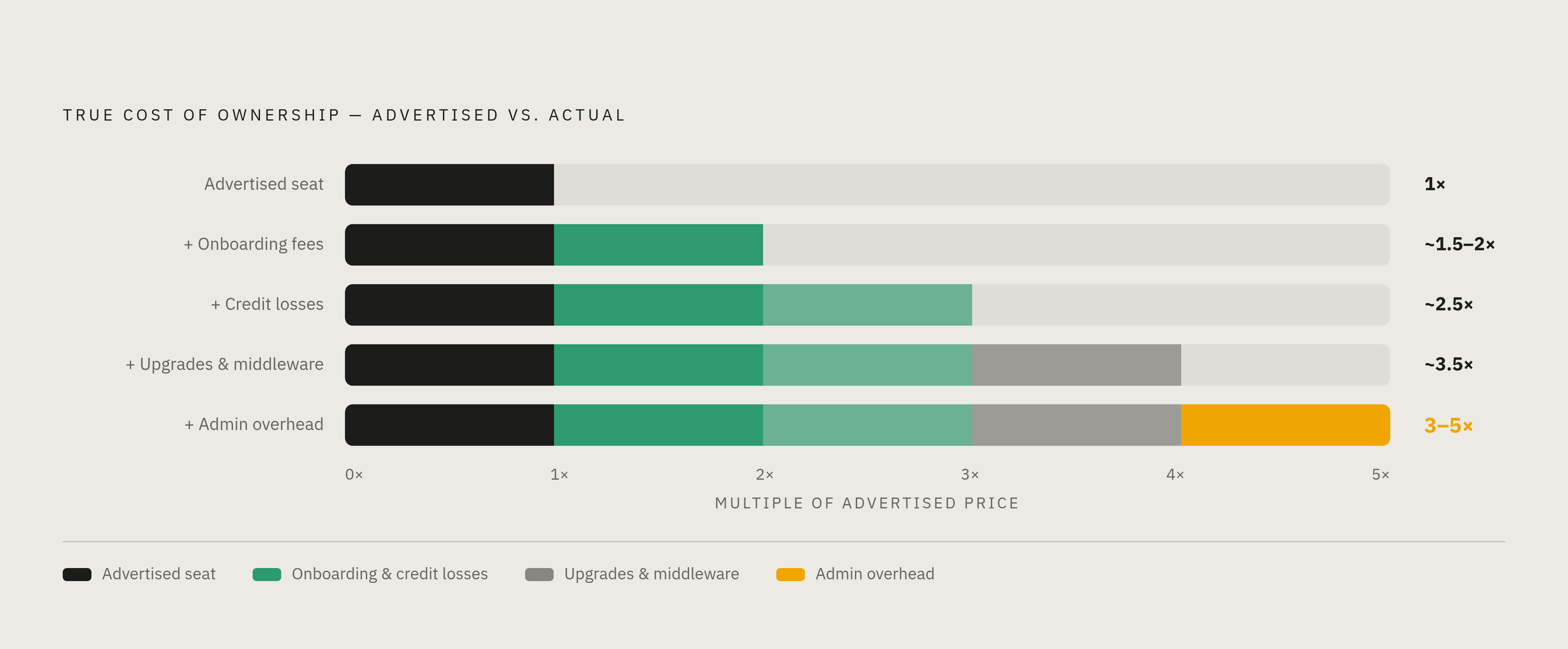
That's not a rounding error, that's the difference between a tool that pencils out and one that quietly drains a budget nobody remembers approving. So where does the multiplier actually come from? Not from one big hidden fee, but from several smaller ones stacking on top of each other, with paid plans ranging from $49 to $119 per user per month on annual billing, and a free plan including 10,000 emails per month SalesMotion.
Onboarding and setup fees are the first layer, and on several platforms they're mandatory and non-refundable, charged whether the rollout goes smoothly or not. Then there's credit expiry: a handful of platforms treat unused credits like a use-it-or-lose-it gym membership, wiping them out monthly regardless of whether the sales team actually needed that many contacts pulled that month. That creates a strange kind of spend pressure where a team ends up burning credits just to avoid losing them. Forced tier upgrades hit next: a team grows, hits a volume limit, and discovers the only way forward is the next pricing tier up, with features bundled in that nobody asked for.
Integration middleware catches buyers most often. Tools without a native CRM connector need third-party automation to bridge the gap, and that bridge costs money and weeks of setup time. Weeks, not days, because middleware setup usually means mapping fields, testing sync direction, and fixing the inevitable mismatch between how one platform defines a "lead" and how the other one does. Layer on top of that the internal cost of just managing one more platform, another login, another admin, another tool somebody has to remember exists.
The downstream damage appears in the numbers on data itself. Almost half of businesses, 48%, say they struggle with data integration, and 35% say low data accuracy directly hurts how efficiently they qualify leads Business Research Insights. They're the actual cost of a tool selection made on sticker price alone, appearing months later as wasted sales hours and stalled pipelines. The advertised seat price, in other words, is an entry ticket. What a team pays to make the tool actually function inside its existing stack is the real invoice, and it arrives in installments nobody put on the calendar. True cost of ownership runs 3–5× advertised pricing for most tools.
The data accuracy problem that every contact database vendor underreports
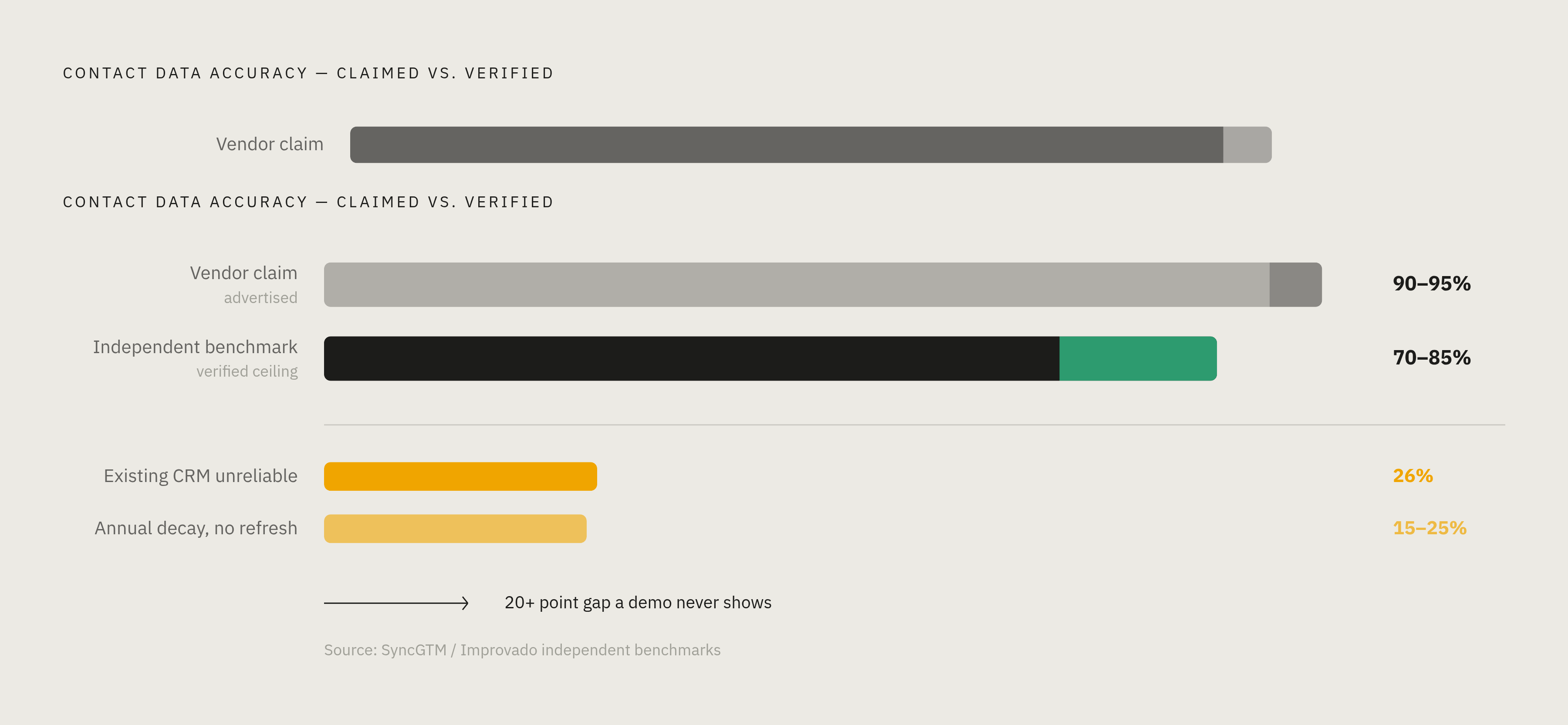
Vendors claim 90–95% accuracy, but independent benchmarks put the real ceiling at 70–85%, SyncGTM research shows Improvado. That gap between the marketing number and the working number is the single most consequential fact in this entire buying decision, because it's the one figure a demo can't show a buyer.
And the gap isn't only a vendor problem. About 26% of a company's own existing data is estimated to be unreliable, which means even a company that never bought a single contact database is already sitting on a quarter of unreliable data before a new vendor enters the picture Sci-Tech Today. Bad data breeds more bad data; a contact list built from a CRM that's a quarter unreliable doesn't get cleaner by adding a new source on top of it.
Then there's decay. Put the vendor claim and the independent benchmark side by side and the practical math gets uncomfortable fast: somewhere between one in five and one in seven contacts in an outreach sequence is wrong before decay even enters the picture Improvado.
What should a buyer actually check, then, before trusting an accuracy claim? The Professional plan starts around a high four-figure annual price per seat, enterprise deals can run into six figures annually, and pricing is quote-only and not published. Whether verification happens at the moment of export, in real time, or was done once and just stored and left to rot. How often the underlying database gets refreshed, not "regularly," an actual cadence. Whether direct dials get verified separately from email addresses, since phone accuracy and email accuracy are not the same problem and vendors love to blur them together. And whether the vendor publishes an actual methodology, or just a headline number with nothing behind it.
Any accuracy claim should be treated as a ceiling to verify, not a guarantee to trust. That's just what a 70 to 85% accuracy ceiling requires of anyone using it seriously Improvado. Models and databases trained once and never refreshed degrade 15–25% in accuracy over 12 months as job changes, company shifts, and buyer behavior evolve, Improvado reports.
Integration fit: why a tool that doesn't connect to your stack is a tool you'll stop using
Data accuracy tells a buyer whether the leads are genuine or fabricated. Integration tells a buyer whether anyone will ever actually use them. Nearly 48% of businesses report struggling with data integration, and that's where tidy ROI projections collapse in practice Business Research Insights.
Lead gen tools sort into six functional categories: on-site capture, B2B data and prospecting, CRM and nurture, conversational or qualification tools, ad sync, and automation or scheduling. These categories rarely overlap cleanly, which means a working setup almost always combines two or three tools, never just one. Anyone shopping for "the one tool that does it all" is shopping for something that mostly doesn't exist, at least not without real trade-offs somewhere in the stack.
That makes integration complexity a bigger predictor of whether a tool survives past its first year than any feature list. A tool that's genuinely excellent in isolation but needs a middleware layer to talk to the CRM is still adding cost and setup time, no matter how good its own dashboard looks. So three questions matter more than anything in the feature comparison chart: Does the tool have a native connector to the CRM already in use, or will it need middleware bolted on? Does data flow both directions, or only one way, meaning updates made on one side quietly vanish on the other? And, maybe the least glamorous but most decisive question of all: who on the team actually owns that integration once it's live, and does that person exist yet?
Team size matters here too. A tool that needs a dedicated ops resource to keep it healthy is a rough fit for a team of one or two people trying to also, you know, sell things. And the data on abandonment backs this up bluntly: integration failure is the single most common reason a paid lead gen tool gets dropped within six months. Not because the tool was bad. Because nobody budgeted the time or the person to keep it wired into everything else.
Motion match: aligning tool category to how your team acquires leads
Where do the leads actually come from right now? Not where a sales leader wishes they came from, where they really originate today. That answer determines almost everything else about which tool category makes sense, and skipping this step is how perfectly capable tools end up gathering dust six months after purchase.
Outbound prospecting and cold email calls for contact databases paired with email automation. Paid acquisition calls for analytics platforms and conversion optimization tools. Events and webinars call for registration platforms feeding into nurture sequences. Buy against the wrong bucket and the tool doesn't fail because it's poorly built, it fails because it was never solving the problem in front of it.
Website, blog, and SEO content came up as the single highest-ROI lead channel, named by 27% of marketers in HubSpot's 2026 State of Marketing Report, a global survey of over 1,500 marketers Improvado Christopher Oliver Consulting. For a business already generating decent organic traffic, that's a strong signal to look at conversion and capture tools before reaching for an expensive outbound database. Why pay for a database of strangers to cold-email when the website's already attracting people who typed the exact question into a search bar?
But how buyers research has shifted too, and that changes what "motion match" even means. Gartner's research found B2B buyers use an average of 7 information sources during a single purchase decision, and 45% of them used generative AI tools to research vendors and products Improvado Gartner / InfoDepots. That's a significant behavioral footnote. It means the old model, where the seller decides where to reach the buyer, is only half the picture now; increasingly, buyers are doing research through channels sellers don't fully control, which makes strong organic content and clear on-site information one of the few places a business still has real influence, whether or not that content originates as sales copy.
The mismatch trap is the section's real warning: a team that buys an outbound prospecting tool while its actual acquisition motion is inbound (or the reverse) sees poor ROI no matter how well that tool performs at the job it was built for. The tool isn't the failure point. The diagnosis was wrong before the purchase happened. And for smaller-market or regionally-focused businesses in particular, organic search and SEO-driven inbound often deliver more leverage per dollar than outbound databases, since outbound tools tend to charge by volume and reach, and reach doesn't scale efficiently in a market that's inherently local or niche.
Applying the framework: what each major tool earns and where it fails
Data accuracy, integration fit, motion match. Those three filters now get pointed at five tools that show up on almost every buyer's shortlist, each one introduced by who it actually serves before what it technically does Improvado.
Apollo.io is the value play for SMBs and outbound-first teams. The database runs 270 million contacts across 60 million companies, with built-in email verification, enrichment, and a Chrome extension for LinkedIn prospecting Improvado SalesMotion. Paid plans run $49 to $119 per user per month on annual billing, and the free plan includes 10,000 emails a month, which is a genuinely usable starting point SalesMotion. Tested email accuracy is 87 to 91%, a real gap below ZoomInfo's 92 to 95%, though rarely one that justifies ZoomInfo's price for SMB or mid-market buyers Balachandran Somu. The built-in engagement suite means prospecting and outreach live in one platform, cutting down on integration dependencies. The weak spots: direct dial accuracy trails ZoomInfo, CRM sync runs one-way on the Basic tier, and mobile credits expire at the end of each billing cycle. Verdict: solid on data accuracy for most SMB use cases, solid on integration for outbound-first teams, but strictly an outbound tool, a poor fit for anything inbound-led.
ZoomInfo is enterprise data at an enterprise price with enterprise requirements Improvado. The database exceeds 500 million contacts, with intent signals fused through its GTM Context Graph, and a hybrid pricing model planned for Q3 2026 that pairs a lower annual platform fee with pre-purchased data credits Improvado. Professional plans start around a high four-figure annual price per seat, with enterprise deals reaching six figures a year, and pricing stays quote-only rather than published. Accuracy is 92 to 95%, the best in the category, meaningful when a business is running thousands of contacts through a pipeline monthly Balachandran Somu. One documented case study shows an 84% MQL lift. But this is a tool built for teams of ten or more sales reps working deals large enough to absorb the cost, and it typically needs a dedicated ops resource to manage data quality and keep integrations running. Verdict: best accuracy on the market, but integration complexity and price structure fail the true cost test for most SMBs, since a 4 to 8% accuracy edge over Apollo rarely earns back the price gap at smaller scale.
LinkedIn Sales Navigator offers the freshest data available, though it's not a full stack on its own. Because LinkedIn is the source, job changes, new hires, and company shifts appear there before any third-party database catches up. Core runs $99.99 a month per seat, Advanced around $169, roughly $2,000 a seat annually. Limitations bite quickly: a 2,500-lead search cap, no CRM sync on Core, and a per-seat price that's steep for what it covers alone. It gets considerably more useful paired with a contact database tool that can pull verified emails off LinkedIn profiles, since on its own it's a signal layer, not a complete prospecting system. Best suited to relationship-based selling, account-based teams, and anyone whose buyers actually live on LinkedIn. Verdict: wins on freshness, fails as a standalone motion match for most teams, and is best read as a complement to something like Apollo rather than a replacement for it.
Clay is the most capable enrichment and personalization tool on the list, and also the one with the steepest learning curve. Pricing got overhauled on March 11, 2026: Launch at $185 a month and Growth at $495, with Enterprise still custom-quoted, replacing three older tiers, and credits now split into Data Credits and Actions Improvado. A free plan offers 100 Data Credits and 500 Actions monthly at no cost. A tested 500-contact list hit 78% email coverage through Clay's waterfall enrichment versus 42% for Apollo alone, a real gap for anyone doing research-heavy outbound Landbase. G2 rates it 4.7 out of 5 across roughly 224 reviews, though Trustpilot tells a rougher story, with multiple 2026 reviews citing slow support and unresolved bugs Improvado. Onboarding typically takes two to three weeks before a team feels comfortable building its own workflows. Verdict: worth paying for when outbound depends on specific, research-heavy personalization and precise timing triggers, not worth it when the actual bottleneck is deliverability, list quality, or weak copy, because Clay doesn't fix any of those.
HubSpot is the strongest all-in-one for inbound lead management, though it gets expensive fast once a team tries to scale on it. It serves customers across more than 135 countries. Starter runs $9 per seat monthly on annual billing, Professional jumps to $800 a month with three core seats included plus a mandatory onboarding fee, and Enterprise runs $3,600 monthly with five core seats SalesMotion. The jump from Starter to Professional is steep, since sequences, workflow automation, custom reporting, A/B testing, and forecasting all sit behind the Professional paywall. It's strongest when a team is already living in HubSpot's ecosystem or building an inbound motion from nothing, thanks to native integrations across most major tools and a free CRM tier that's a legitimate zero-budget starting point.
Each one earns its cost only for a specific team, running a specific motion, with a specific stack already in place. Which is really the whole point of building the framework first: run data accuracy, integration fit, and motion match against a shortlist before comparing a single price tag, and the right answer tends to become obvious well before the sales call does. Pricing tiers (2026). A real Year-1 cost for a 50-employee B2B SaaS company on Marketing Hub Professional runs approximately 3.3× the headline subscription price once onboarding, contact tier overages, and required upgrades are factored in. Breeze AI agents launched at INBOUND 2024, and the writer should verify current Breeze feature scope from HubSpot's official communications at time of writing Improvado. The verdict is that it passes motion match for inbound-first teams, though true cost of ownership fails the 3–5× test if buyers anchor to Starter pricing and later require Professional features.