Technical SEO Audit Checklist for Small Business Sites
Small defects pile up quietly, costing ten percent here and twenty there until rankings collapse.

Technical SEO feels like the kind of discipline that rewards the paranoid. You spend an afternoon convinced your title tags are the problem, rewrite them, watch nothing happen, and then spend the next afternoon convinced it's your backlinks. Meanwhile, somewhere in your robots.txt file, a single disallow rule is quietly telling Googlebot to leave. You rarely see the symptom on the front end. The site looks fine. Rankings don't.
That is, in a sentence, the actual mechanism behind most small business ranking problems. Not one catastrophic mistake. Not a penalty. An accumulation of small defects across multiple layers, each one costing a little, together costing a lot. A 2024 Ahrefs study found that over 60% of websites carry critical technical SEO errors that directly suppress rankings, and the majority of affected site owners are unaware. The average site carries around 127 technical issues. Fortune 500 companies average 85. Scale provides no immunity; it just provides more engineers to ignore the problem.
The difference for small businesses is margin. A large e-commerce site can absorb crawl waste and index bloat and still rank on brand authority. A ten-page local business site cannot. Per onwardSEO's 2024 to 2025 audit data, fixing crawl waste, index bloat, thin content, and inconsistent sitemaps in combination recovers between 18% and 42% of organic sessions within 60 to 120 days. That range is wide, but the floor is not nothing.
The goal here is not to gold-plate a working site. It is to find what is already suppressing rankings, fix it in priority order, and measure the result. A small site under 100 pages can complete a thorough audit in two to four hours. The barrier is knowing what to look for.
Before You Touch a Single URL, Build the Scaffold
The single most expensive mistake in a technical audit is fixing things in the wrong order. Structured data is irrelevant if Googlebot cannot crawl the page. Performance scores are irrelevant if the page is noindexed. The hierarchy matters: crawl blocking and HTTPS first, then indexability, then performance, then structured data. Downstream issues become irrelevant if the upstream problem is never resolved.
Establish a baseline before touching anything. Export your current Google Search Console coverage and performance data. Screenshot it if you must. The goal is to have something to measure against; otherwise, you are flying without instruments and cannot attribute any subsequent traffic change to the work you actually did.
The tool stack that costs nothing to start: Google Search Console covers indexing status, Core Web Vitals field data, mobile usability, and security issues. PageSpeed Insights provides lab and field data for performance. Screaming Frog crawls up to 500 URLs free and simulates how a bot traverses your site. Google's URL Inspection and Mobile-Friendly Test handle spot-checking individual pages. That is the full working toolkit for most small business audits.
On frequency: run a full audit at least quarterly. Run a targeted audit after any redesign, platform migration, plugin installation, or large content update. Those events are where technical defects are most commonly introduced, usually by someone who was focused on the feature and not the SEO implications.
One more principle before diving in: separate "fix now" from "monitor." The checklist produces a ranked fix list, not a state of emergency. Not every issue warrants immediate action. The prioritization framework is what makes the checklist useful rather than paralyzing.
Crawlability: Making Sure Googlebot Can Reach Every Page That Matters
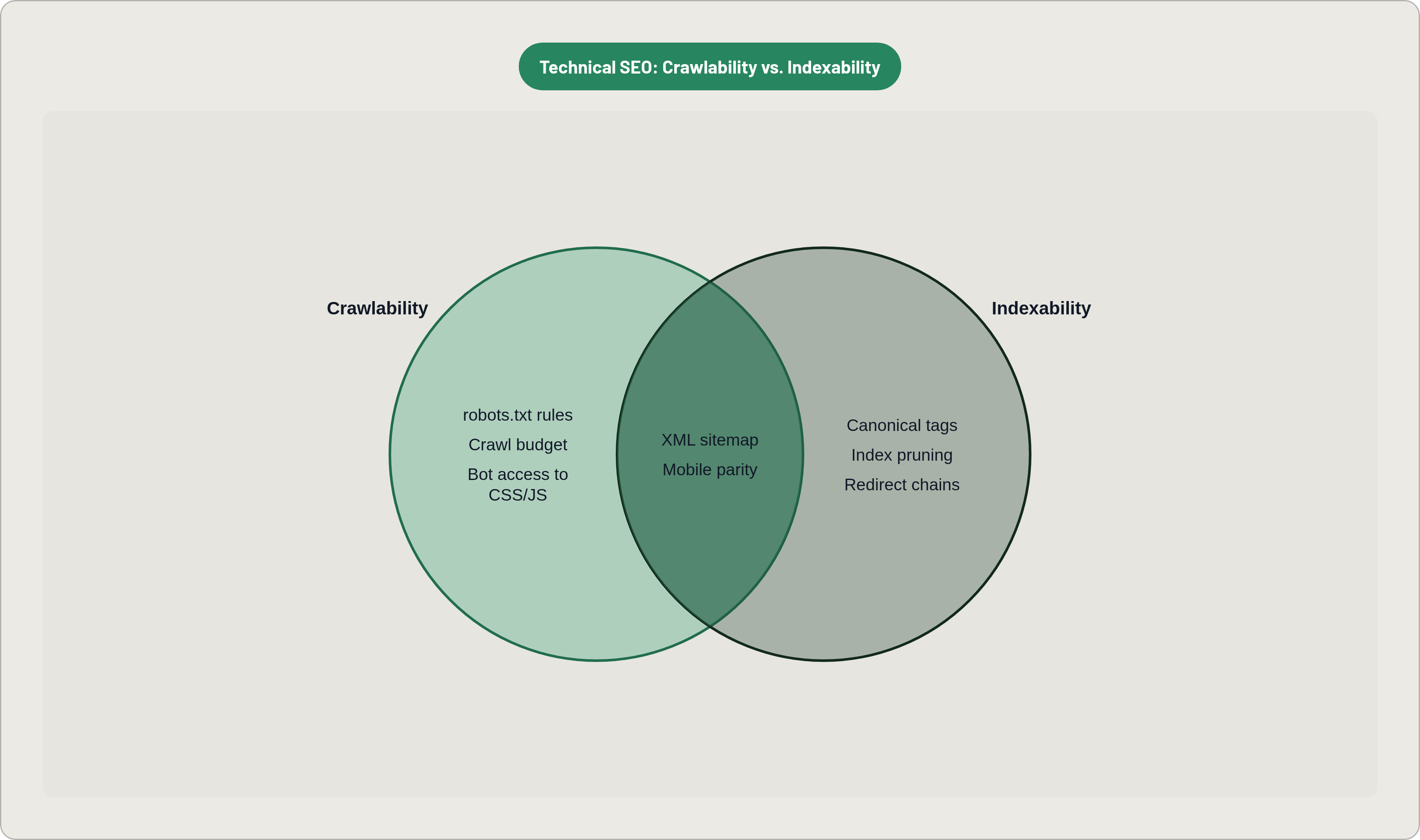
A single misconfigured robots.txt can deindex an entire site overnight. It is the highest-severity single point of failure in technical SEO, and it is also one of the most frequently misconfigured files in existence, partly because it looks deceptively simple.
Start here. Confirm the file exists at your root directory. Then read every disallow rule and ask whether it is intentional. Common accidental disallows: CSS and JavaScript directories (which Googlebot needs to render the page), key page templates, and entire subdirectories blocked during staging that were never unblocked on launch. Google Search Console's robots.txt tester or URL Inspection will confirm what Googlebot actually sees.
The XML sitemap URL should be referenced in robots.txt. This is not a ranking factor; it is a navigation aid. Googlebot will find your sitemap through other means if it is missing here, but there is no reason to make it work harder.
Beyond robots.txt, the next common crawl failure pattern for small business sites is the CMS migration hangover. Old pages return soft 404s. Auto-generated tag, archive, and author pages proliferate and consume crawl budget while the pages that actually matter wait in queue. The practical action: pull the Coverage report in GSC and identify every URL returning a soft 404. Then audit your CMS settings to determine how many parameter URLs and duplicate category pages it is generating. Even a 20-page site can produce dozens of these if the CMS is left in default configuration.
That raises an important question: does crawl budget actually matter for a small site? Technically, Google allocates crawl budget based on site authority and server capacity, and a 20-page site probably does not have a crawl budget crisis in the traditional sense. But the principle still applies. Every page Googlebot visits that does not need to be visited is a page your actual content pages are competing with for attention. Keep the signal clean.
One mobile-specific crawl risk that surfaces repeatedly in audits: robots meta tags must be identical on mobile and desktop versions. Under mobile-first indexing, if a noindex tag appears only on the mobile version of a page, Google will skip that page entirely. It sounds like an edge case; it is not. It is a common post-redesign failure mode.
Indexability: Confirming the Right Pages Are Indexed and the Wrong Ones Aren't
A site can have excellent content and still lose traffic from a stray noindex tag or a broken XML sitemap. These errors leave no visible symptom on the front end, which is precisely what makes them so effective at suppressing rankings without triggering any obvious alarm.
The meta robots check is straightforward: confirm that every page meant to rank carries index, follow and that every page that should not rank, thank-you pages, admin URLs, filtered duplicate parameters, carries noindex. Then audit your XML sitemap. It should contain only canonical, indexable URLs returning 200 status codes. Any 301 redirects or 404s listed in the sitemap are a signal to Google that your site navigation is not well-organized; Google will likely follow the correct URL anyway, but the inconsistency adds noise.
The GSC Coverage report has three categories that demand immediate attention. "Duplicate without user-selected canonical" means you need to add a canonical tag. "Duplicate, Google chose different canonical than user" means your canonical declaration is being overridden, most often by internal linking patterns that point predominantly to the non-canonical version. "Excluded by noindex" requires you to confirm that every exclusion is intentional; unintentional exclusions are especially common after platform migrations.
On canonical tag mechanics: Google has confirmed that canonicals consolidate link equity similarly to 301 redirects, but the distinction matters. A 301 is a server directive; Google must obey it. A canonical is a hint that Google can choose to ignore. If your internal links point predominantly to the non-canonical version, Google will often override your declared canonical and choose the version that receives the most internal link signals. The fix is not just adding the canonical tag; it is auditing internal linking to ensure it consistently targets canonical URLs.
One nuance worth understanding for JavaScript-framework sites: canonical tags must be set in raw HTML, rather than injected by JavaScript. Google's updated JavaScript SEO documentation flags this explicitly. If there is a conflict between the raw HTML canonical and the rendered canonical, Google ignores the conflicting signals, and the outcome is unpredictable.
Index pruning is underused by small businesses and overdue on most sites. Pages with zero organic traffic over twelve months are candidates for noindex or consolidation with a stronger page. The rationale is not punitive; it is about concentrating link equity on pages that actually perform. A leaner index tends to perform better than a bloated one.
Redirect chains deserve a separate call-out. Every hop in a redirect chain dilutes the signal passed. Audit for chains longer than one step and collapse them to direct 301s.
HTTPS and URL Consistency as Foundational Ranking Signals
Per 2025 Ranktracker data, HTTPS adoption correlates with roughly a 5% ranking improvement. That is not a transformative number, but it is the easiest win on this list, and it doubles as a trust signal for users who notice the padlock. If your site is still serving pages over HTTP in any configuration, the fix is non-negotiable.
URL canonicalization is where many small business sites quietly fracture their domain authority without realizing it. The rules are simple: choose www or non-www and enforce it via 301 redirect, set your preferred version in GSC. Choose trailing slash or no trailing slash and apply it consistently across all internal links and canonical tags. Ensure that HTTP versions of every URL 301 to their HTTPS equivalents.
The practical test: run your root URL through four variants, http://www, http://, https://www, and https://. All four should resolve to a single canonical version. If any variant serves content directly instead of redirecting, you are splitting your authority across versions of the same URL.
Mixed content warnings deserve attention on sites that migrated from HTTP to HTTPS. An HTTPS page that loads HTTP resources, images, scripts, stylesheets, can suppress the secure-site ranking signals you just worked to establish. Browser DevTools or Screaming Frog will surface these quickly.
It is also worth considering the security monitoring dimension of GSC. Google Search Console actively scans for hacked content, malware, and security threats. An unmonitored security issue can trigger manual actions that remove pages from the index. This is a real risk for small businesses; sites with outdated CMS plugins are targeted routinely.
Core Web Vitals: The Performance Metrics That Actually Affect Rankings
As of 2025, only 47% of websites pass their Core Web Vitals assessment per Magnet. More than half of your competitors are failing a direct Google ranking factor. That is the market opportunity framed plainly.
The three metrics: LCP, or Largest Contentful Paint, measures loading performance and should be under 2.5 seconds. INP, or Interaction to Next Paint, replaced FID and measures responsiveness; the target is under 200 milliseconds. CLS, or Cumulative Layout Shift, measures visual stability and should be under 0.1.
The critical distinction that most people miss: only field data affects rankings. PageSpeed Insights lab scores and Lighthouse scores are diagnostic tools, useful for identifying what to fix. They do not move rankings. GSC's Core Web Vitals report draws from the Chrome User Experience Report, which is real user measurement data. Chrome desktop and Android Chrome both count. Chrome on iOS is excluded because it runs on WebKit. Test your mobile field data specifically, because that is where the ranking signal lives.
Why does this matter in practice? A page loading in 1.2 seconds on desktop fiber may produce an LCP of 3.8 seconds on a mid-tier Android on a typical 4G connection, which is a failing score. The desktop test tells you almost nothing relevant. The mobile field data tells you what Google is actually evaluating.
Google's own data shows that 53% of mobile users abandon a site that takes more than 3 seconds to load. The ranking signal and the conversion signal are pointing the same direction; optimizing for one optimizes for both.
The highest-leverage LCP fixes for small business sites: convert hero images to WebP or AVIF and compress without quality loss. Add lazy loading to off-screen images. Implement a CDN; sites using CDNs see an average 50% improvement in load times and 27% reduction in latency. Eliminate render-blocking JavaScript and CSS above the fold.
The Vodafone case is illustrative: a 31% LCP improvement produced an 8% boost in sales per Search Engine Land's 2024 reporting. Performance optimization is a revenue lever, not merely a ranking exercise.
Mobile-First Indexing: What Google Actually Crawls and Ranks From
Google completed its mobile-first indexing rollout in 2024. The mobile version of every site is now the primary input to the index. If your audit focuses on the desktop experience, you are auditing the wrong version.
Mobile traffic globally exceeds 60% of total web traffic, and for local, retail, and consumer-facing categories it climbs above 75%. The audience and the crawler are both mobile-dominant. Desktop optimization is not irrelevant; it is just secondary.
The most critical mobile-first check is content parity. If text, headings, structured data, or metadata are removed from the mobile version to "clean up" the layout, Google only ranks what it sees on the smartphone version. This is a surprisingly common design decision. It is also a straightforward way to remove ranking signals from your own pages without any third party involved.
Internal linking on mobile requires specific attention. If your mobile navigation collapses menu items that are fully expanded on desktop, those links must still be present in the initial HTML. CSS display: none hides elements from users but not from Googlebot; however, links revealed only via JavaScript interaction may not be followed. One instructive case: a SaaS site removed footer links on mobile to simplify the visual layout. Google stopped crawling those destinations and the site lost a significant share of its internal PageRank flow. Restoring the links in a mobile accordion recovered rankings within two weeks.
The checklist items specific to mobile-first are straightforward. Confirm identical meta robots tags on mobile and desktop. Confirm identical structured data on mobile and desktop. Confirm no resources are blocked by robots.txt that Googlebot's smartphone crawler needs to render the page. Confirm image alt text is consistent between versions. Validate with Google's Mobile-Friendly Test and URL Inspection in GSC.
JavaScript Rendering Risks That Delay or Prevent Indexing
Google renders JavaScript. That sentence has been used to justify a lot of architectural decisions that turned out to be expensive. The nuance that matters: Google renders JavaScript in a two-wave process that can delay indexing by days or weeks. Content that only exists after client-side rendering may not be indexed on the first crawl pass, and for some sites, the second wave never comes at all.
A December 2025 clarification from Google on its rendering pipeline specified that pages returning non-200 HTTP status codes may be excluded from the rendering queue entirely. The implication: if your server is returning anything other than a 200 status for a page you want indexed, the rendering process may not execute, regardless of what the page displays to users.
Single Page Applications carry a specific and underdiagnosed failure mode. An SPA that serves a 200 OK shell for a route that eventually loads a "404 Not Found" component via JavaScript may have that error state indexed as a valid page. Google sees the 200 on the server response, renders the shell, and indexes whatever the JavaScript eventually displays. If the JavaScript displays a 404 component, that gets indexed. The site owner sees a valid page in the browser and rarely knows.
There is also the AI crawler dimension, which is increasingly relevant. Per Cloudflare Radar's Q1 2026 data, bots now account for 30.6% of all web traffic. Most AI crawlers, including GPTBot, ClaudeBot, PerplexityBot, and CCBot, do not render JavaScript at all. Content dependent on client-side rendering is invisible to AI retrieval systems. If your business strategy includes appearing in AI-generated answers, and most businesses should consider it by now, server-side rendering or static generation is worth prioritizing.
The gold standard is simple: full HTML available in the initial server response, no JavaScript execution required. The audit actions: use GSC's URL Inspection "View Crawled Page" to compare raw HTML against the rendered version. Gaps indicate content Googlebot may miss. Test key pages with JavaScript disabled in your browser to see what a non-rendering crawler sees. Check HTTP status codes returned by the server directly, not just what the SPA displays to users.
Structured Data: The Technical Layer Connecting Pages to Rich Results and AI Answers
Per Backlinkio, 72% of first-page results use schema markup. Per W3Techs 2025 data, 23% of websites have no structured data at all. For small businesses, this gap is an opportunity rather than a baseline expectation. You are not catching up to a standard; you are stepping into a space most of your competitors have not bothered to enter.
What structured data unlocks has expanded significantly. Beyond traditional rich results, schema markup now supports eligibility for Google AI Overviews and AI Mode, entity recognition in the Knowledge Graph, and citation signals used by ChatGPT, Perplexity, Gemini, and Claude when generating AI answers. In 2026, schema markup drives 20 to 40% higher click-through rates through rich snippets. The CTR impact is now measurable as a direct traffic lever, not just a ranking signal in the abstract.
But what if your schema is wrong? Invalid structured data not only fails to generate rich results; in some cases it triggers manual actions for spammy markup. Validation is therefore required. Google's Rich Results Test and Schema.org validator should be part of every audit.
Priority schema types for small businesses depend on category, but the broadly applicable types are LocalBusiness (with NAP consistency across all instances), FAQPage for content that answers specific questions, BreadcrumbList for site navigation, and Review or AggregateRating where earned reviews exist. For e-commerce, Product schema with price, availability, and review data is high priority. For service businesses, Service schema with relevant attributes.
One implementation note that catches small businesses repeatedly: structured data must match the on-page content. Schema markup that claims a review score not visible on the page, or a price not displayed to users, violates Google's guidelines. The schema should describe what is actually there, not what you wish were there.
The audit process for structured data is also the simplest on this list. Run your key pages through the Rich Results Test. Review the GSC Enhancements report for structured data errors. Fix invalid markup before adding new types. The order matters because invalid markup on a page can sometimes interfere with the valid markup on the same page.
The through-line across all seven of these areas is the same: small defects compound. A robots.txt issue that costs you 5% of crawlable pages, a noindex tag that suppresses 10% of your indexed content, a mobile performance gap that loses 15% of visitors before they engage, and a structured data error that removes you from rich result eligibility: none of those alone is catastrophic. Together they explain why a site with good content can still rank poorly for years without an obvious explanation.
The audit does not have to be a long project. It has to be systematic. Know the hierarchy, fix in priority order, establish a baseline, and measure against it. The barrier is not time; it is knowing where to look.


